Solve Static Logic Failure with FoMS 2.0
Move past manual trading and overfitted, “black-box” systems that fail when regimes shift. Driven by an adaptive Bayesian Switch Engine, FoMS 2.0 deploys 30 orthogonal algorithms with WFA validation to preserve your Alpha in any market state.

Core Quantitative Architecture
Shadow Trading Sandbox
LAYER 1Runs continuous Multi-State Virtual Simulations. Executes invisible background trades to map safety zones and structural breaks before risk deployment.
Bayesian Switch Engine
LAYER 2Dynamically calculates strategy health coefficients. Rotates through orthogonal algorithms based on real-time Recovery Factor optimization.
15-Factor Vector Matrix
LAYER 3An advanced multi-timeframe filtering cluster analyzing higher timeframe macro trends and volume flow to suppress false breakout anomalies.
ML Noise Discriminator
LAYER 4A machine-learning execution overlay that measures real-time volatility thresholds to block overfitted trades during market contraction phases.

30 Parallel Orthogonal Strategies
Trend & Momentum Clusters
- High-velocity Volatility Expansion systems targeting macro structural break shifts.
- Multi-Timeframe Trend-Following matrices aligned with the 15-Factor Vector layer.
- Adaptive Exponential Ribbon channels tracking structural liquidity expansion.
Mean Reversion & Volatility Clusters
- Dynamic Mean Reversion channels reacting to statistical exhaustion anomalies.
- Volume Profile value-area scanners tracking localized macro-liquidity blocks.
- Localized Overbought/Oversold oscillators adjusted by real-time ML noise index.

Mathematical Overfitting Protection
Traditional TradingView scripts look perfect on history due to static curve-fitting. FoMS 2.0 solves this by deploying a rigorous machine-learning validation model.
Rolling Walk-Forward Analysis (WFA)
To eliminate the illusion of historical profitability, FoMS 2.0 uses rolling Walk-Forward Analysis. The framework continuously divides historical market segments into optimization and validation blocks, ensuring the system adapts to true structural dynamics rather than past noise.
100% Out-of-Sample (OOS) Execution
Every single simulated test trade in the framework is strictly executed on Out-of-Sample (OOS) data. The algorithm remains completely “blind” to the price action blocks it evaluates, completely neutralizing the influence of history length or curve подгонки.
Whether you backtest across 6 months or 5 years of ticks, the local validation engine measures decay speed and net mathematical edge under persistent regime degradation. If a cluster fails to maintain alpha on out-of-sample structures, the Bayesian engine auto-rotates it out of production risk completely.
Instant Multi-Exchange Automation
FoMS 2.0 has native integration with the TradingViewToAnywhere protocol. No complex manual formatting required — the script handles everything natively.
// Real-time alert string automatically pushed by FoMS 2.0 engine:
Close 1000PEPEUSDT C=LINEAR +2.27$ Buy 1000PEPEUSDT Q=13276.2944 SL=0.006545 TP=0.010168 L=50 D=2 C=LINEAR St:21Out-of-the-Box Exchange Integration
By default, the framework automatically formats execution messages perfectly optimized for tradingview.to. Instantly route high-velocity orders to global crypto leaders:
Workflow on Mobile
Configure, deploy, and monitor your automated trading framework directly from your smartphone.

Configure & Create Alert
Optimize your script settings on the TradingView mobile app, then set up your high-velocity Webhook alert in seconds.
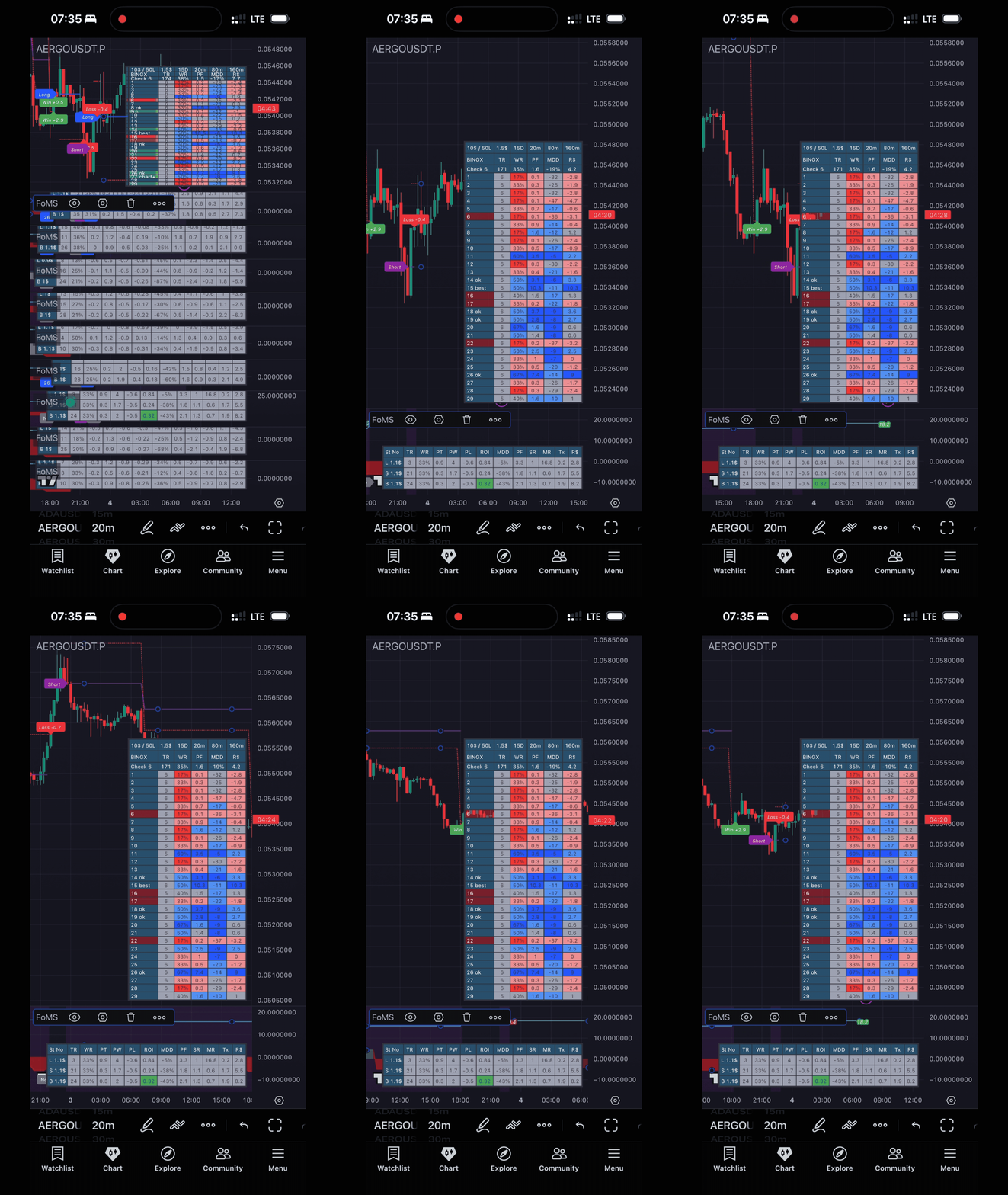
Real-Time Execution
Watch the localized Bayesian Engine process market matrices and flawlessly forward signals straight to the TTA bridge.

Exchange Results
Track actual trading profits and execution metrics from your crypto exchange futures account, updated 24/7.
Ecosystem Comparison
See how the FoMS 2.0 ML-Driven Framework stacks up against traditional trading tools and platforms.
| Feature | FoMS 2.0 Framework | 3Commas | Cryptohopper | Native Exchange |
|---|---|---|---|---|
| Number of Strategies | 30 Orthogonal Strategies | 20 (Grid, DCA, Signal) | 100+ Static Scripts | Grid, DCA, Martingale |
| Strategy Switcher | ✅ Localized Bayesian Engine & Recovery Factor Auto-Rotation | ❌ None | ✅ AI (Black Box) | ❌ None |
| HTF Filters | ✅ Machine Learning & 15-Factor Vector Matrix | Limited to single strategy | ✅ Standard Indicators | ❌ None |
| Backtest Capabilities | ✅ Full Walk-Forward Analysis (WFA) & Multi-State Testing | Limited to DCA / Grid | Limited. Unable to test switcher | ❌ None |
| Ease of Setup | ✅ TradingView & High-Velocity TTA Bridge | ✅ API Only | ✅ API Only | ✅ Yes, no API needed |
| Pricing | $299 One-time Purchase Save $1,000+ in the first year! | $1,320 / year ($110 / month Expert) | $1,548 / year ($129 / month Hero) | Free |
Get Access to FoMS Framework
Upgrade your trading setup with machine-learning driven strategy and seamless exchange automation.
Unlock the power of machine learning, advanced drawdown evaluation, and adaptive multi-timeframe analytics.
FoMS 1.0 Legacy Bot ↗
Want to start with the essentials? The original multi-strategy webhook bot remains 100% Free. Just message RGtrue on TradingView to request access.
3 Steps for Complete Automated Trading Setup:
-
1
Access the Script: Purchase FoMS 2.0 Lifetime or request FoMS 1.0 for free via TradingView DM.
-
2
Enable Webhooks: Set up TradingView Webhook Alerts (TradingView Essential Plan or higher required).
-
3
Bridge to Exchange: Connect your alerts using TradingView To Anywhere to execute automated trades on your exchange.